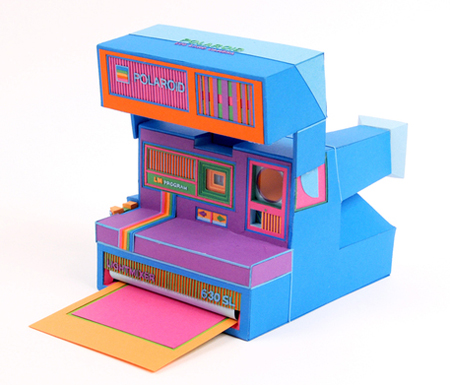
The photo camera and the Polroid were crafted by design studio Zim and Zou based in Nancy, France, and there is more colorful retro electronic devices made of paper to admire.
Showing posts with label Camera. Show all posts
Saturday, July 9, 2011
Papercraft Celebrates Retro Photo Cameras
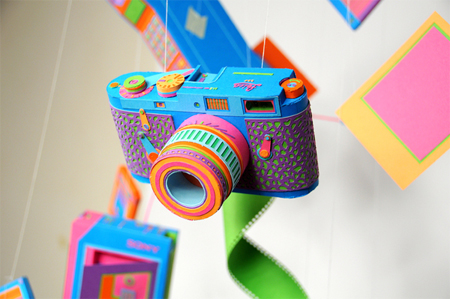
These 100% recyclable retro cameras are for keeps. Each device is cut by hand utilizing sustainable paper, and even the smallest “waste” scraps are re-used to form some of the smallest detailed components.

The photo camera and the Polroid were crafted by design studio Zim and Zou based in Nancy, France, and there is more colorful retro electronic devices made of paper to admire.


The photo camera and the Polroid were crafted by design studio Zim and Zou based in Nancy, France, and there is more colorful retro electronic devices made of paper to admire.
Friday, July 8, 2011
Point-and-Click Tips: Taking the Red Eye Glow Out Of the Picture
Red eyes (red glow in pupils) in photos is a common phenomenon when taking pictures of people or animals using a flash.

Some cameras support a "red eye reduction" mode. In that mode the camera fires the flash a few times before taking the photo. Although this helps reducing the red-eye effect, it can also result in photos of people with their eyes closed (as they blink when blinded by the pre-flash).
There are a few things that you can do to prevent red-eyes.
1. Take the pictures with sufficient light in the environment so that your subjects' pupils decrease in size.
2. Tell them to look to the side of your camera - not straight at the camera.
3. Have someone divert babies or pets' attention so that they look away from the camera.
Some cameras include built-in image processing software that automatically removes red-eye from the photos, or you can use Picasa or other online photo editing software. Make sure that the software only effects the eye area and doesn't change the color of other elements in the picture that happen to have the tint typical of the red eye effect. Software trips in such cases as it works on formulas and doesn't exercise common sense.
Another option is having it done by professional photo retouchers for as low as $3.50, especially in case you have captured a close portrait in a dark environment and now the whole eye retina is glowing red.


Some cameras support a "red eye reduction" mode. In that mode the camera fires the flash a few times before taking the photo. Although this helps reducing the red-eye effect, it can also result in photos of people with their eyes closed (as they blink when blinded by the pre-flash).
There are a few things that you can do to prevent red-eyes.
1. Take the pictures with sufficient light in the environment so that your subjects' pupils decrease in size.
2. Tell them to look to the side of your camera - not straight at the camera.
3. Have someone divert babies or pets' attention so that they look away from the camera.
Some cameras include built-in image processing software that automatically removes red-eye from the photos, or you can use Picasa or other online photo editing software. Make sure that the software only effects the eye area and doesn't change the color of other elements in the picture that happen to have the tint typical of the red eye effect. Software trips in such cases as it works on formulas and doesn't exercise common sense.
Another option is having it done by professional photo retouchers for as low as $3.50, especially in case you have captured a close portrait in a dark environment and now the whole eye retina is glowing red.
Subscribe to:
Posts (Atom)