Showing posts with label photography. Show all posts

Tuesday, July 26, 2011

What Is 'Natural' in Photography?

Some time ago I saw an amateur picture of a woman with her baby posted online with a defiant comment that she was proud of her natural unretouched look. The picture looked pretty bad. You could tell there wasn't enough light in the room when it was taken, so her skin and he baby looked earthy and bluish. The low angle from which the photo was taken was rather unflattering. She had no makeup on and her hair was messy.

I couldn't understand her logic. If you are shooting a picture for keeps and posting online you would normally pretty yourself up to have a photo that celebrates you and brings you in a good mood.You would ask someone to take the photo of you so that person would give you directions for better posing.

Then there was another comment that made me join the discussion. She compared the "honesty" of her photo to the "naturalness" of Annie Leibovitz photography. Without stating the obvious points of difference between the lady's self-portrait and the creations of a genius, I'll get to the educational part: the 'naturalness' of great portraits is achieved through hours of collaborative work.

For starters, the photographer will help you with posing and your facial expression to make sure you do relax and do look natural in front of the camera. A real professional will make sure the background doesn't have any distracting elements to spoil the view: water bottles, bags, exit signs, or any other clutter.

S/he will watch out for stray strands of hair, wardrobe malfunctions, and other obvious issues.

A top-level photographer comes with a crew that includes, depending on the budget, the following type of helpers:

- Lighting Assistant who directs a reflector to bounce light onto the subjects, sets up flash stands and adjusts the settings on external flash units, and holds and aims video lights.

- Photographic Stylist who collects the necessary materials and props before the shoot from various suppliers, arranging objects in the desired fashion and setting up lights and special effects, if any, e.g. fog, wind or rain.

- Hair and Makeup Stylist - Even a natural beauty that doesn’t need much help but a little enhancement can go a long way with some makeup. As a minimum, you need a flash-resistant foundation so that your skin doesn't appear oily. During the shoot, this professional corrects the smudges and watches out for stray strands of hair.

- Wardrobe Stylist - knows how to accentuate the positive attributes of the people they dress. Choosing the right outfit to flatter someone—in a way that is appropriate for each event—is an art. Fashion styling requires extensive knowledge of the fashion industry and a knack for matching your clients with the clothing that will support the image they want to project.

Depending on the chosen style these professionals can present different facets of YOU.

In 2008, Vogue Paris demonstrated how, without any retouching, and only with the application of makeup, wardrobe lighting the same woman could appear as a 10, 20, 30, 40, 50 and 60-year old:
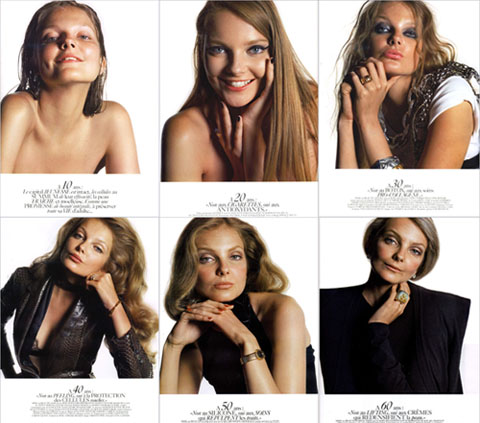

Vogue Paris November 2008 with Eniko Mihalik by Inez van Lamsweerde and Vinoodh Matadin styled by Carine Roitfeld, make-up by Lisa Butler

Technically, these are natural (unretouched) photos, unless you consider makeup that women wear routinely to be a grand illusion. But somehow I think that discretely retouched portraits where photography flaws have been eliminated, skin has been cleaned, undereye shadows lightened, static hair removed, and the background clutter eliminated to be more 'natural':

Amateur photo edited to look like a studio portrait


Share this post on Tweeter

Bookmark and Share

Enhanced by Zemanta

Saturday, July 9, 2011

Papercraft Celebrates Retro Photo Cameras

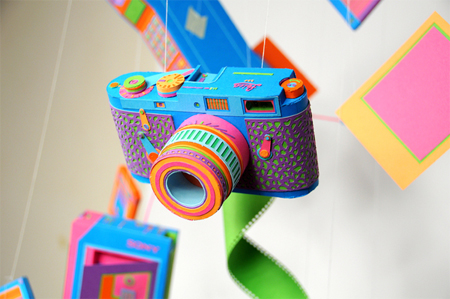
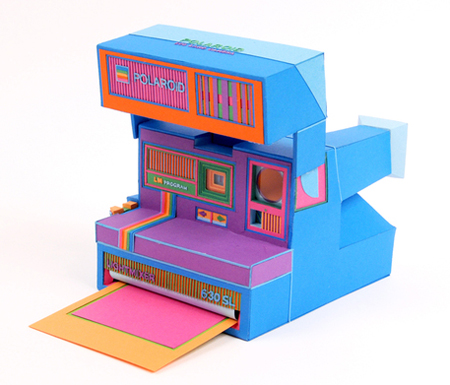
These 100% recyclable retro cameras are for keeps. Each device is cut by hand utilizing sustainable paper, and even the smallest “waste” scraps are re-used to form some of the smallest detailed components.


The photo camera and the Polroid were crafted by design studio Zim and Zou based in Nancy, France, and there is more colorful retro electronic devices made of paper to admire.


Share this post on Tweeter

Bookmark and Share
Enhanced by Zemanta

Thursday, January 13, 2011


13 Jan, 2011 - MomentVille.com, one of the worlds leading wedding websites, has just announced that PhotoHand has been selected for the 2011 Wedding Professional Hot List.

The annual Wedding Professional Hot List recognizes excellence within the wedding industry, as determined by reviews from tens of thousands of brides and grooms. PhotoHand was among the best reviewed vendors in their area in the past year.

"The Wedding Professional Hot List recognizes best of class wedding professionals." said Geoff Evason, MomentVille's CEO. "Highlighting the success of the top wedding professionals is an exciting way to spread the word and help newly engaged couples find the right professionals for their own weddings."

About PhotoHand
PhotoHand will retouch your wedding photos at the starting fee of $3.50/photo for complete cosmetic photo retouching. Also, on offer there are custom-designed save-the-date cards and wedding invitations and wedding photo books from your photo material. With professional photo editing and photography retouching, skillful cropping and art effects, your book becomes an outstanding memorable piece.

About MomentVille
MomentVille.com offers engaged couples and wedding enthusiasts a one stop place for planning and sharing a wedding. Offering personal wedding websites, wedding planning tools, a gorgeous gallery of wedding pictures, a searchable list of reviewed wedding vendors, and lots of helpful and inspiring wedding content, MomentVille helps newlyweds with all aspects of their wedding. For more information contact media@momentville.com


Share this post on Tweeter

Bookmark and Share
Enhanced by Zemanta

Monday, October 5, 2009

Glamor with a Disclaimer

PhotoHand-blog-illustration-retouching
To fight self-esteem problems experienced by girls and women who feel pressure to fit the standards set up by advertisers, British and French lawmakers are pushing for laws that force the Advertising industry to disclose when retouching is used on models. According to the proposals, all ads where retouched images of models have been used should carry a disclaimer stating that changes have been made.

You would think that in our day and age, everyone knows that ad images are artistic interpretations. They are decorative. Let's be honest, you wouldn't want Calvin Klein ads to feature "guys from work".

I personally think "feel-good" movies are more damaging for the psyche of young women. And, if we continue along the disclaimer path, they should run a marquee warning during romantic comedies and Cinderella-plot movies saying this is just wishful thinking and no one should fall for this delusion.

As for photo retouching, it has become a natural part of the process of developing an image for publication. It puts fixes where the photography failed. You always do the bare minimum checklist:

- Improve lighting
- Adjust colors
- Remove flyaway hairs
- Remove glare
- Remove shadows from faces
- Even out skin tone
- Cover up temporary skin imperfections
- Correct smudged make-up
- Fix clothes

These are the basics of photography post-production that have nothing to do with manipulation of the public conscience.

And if you still consider this an illusion than the illusion starts from the production stage. There is a crew of workers besides the photographer at any proper fashion or celebrity shoot. If you have ever watched America's Next Top Model then you should know how a good make-up artist, stylist, and lighting specialists can improve the outcome and make the photo look glamorous, the way you (let's face it) like it.

Wednesday, September 2, 2009

PhotoHand.com Catches Growing Attention of Professionals and Small Businesses

Fast and affordable online service for image editing and photo design - PhotoHand.com is quickly turning into one of the most valuable online resources for small/SOHO business, entrepreneurs and professionals looking to boost their images.

Traditionally limited by modest marketing budgets and now influenced by the current recession, professionals and small businesses are reconciled with the fact that their promotional images can’t rival those of corporations. PhotoHand.com is changing this perception by bringing Madison-Avenue quality image editing and photo design to Main Street folks.

The strictly online mode of operation might not fit the processes of large companies but it is perfect for Actors, Models, Consultants, Dentists, Indie Designers, Small Manufacturers, Beauty Professionals, Tattoo Artists, E-shop Owners... the list goes on.

Just upload your photos through PhotoHand.com website, supply your directions in plain language (what you want or what you don't like in the photos) and in three business days you have the images that will make you or your business stand out - all without breaking the bank.

PhotoHand's fees start at $3.50 per photo for complete cosmetic retouching. For $11.95 your product photo will be altered into an ad worthy of glossy magazines. Online proofing and changes are free.

Unlike many photographers, PhotoHand works under the "work-for-hire" clause and thus does not claim copyright over retouched photos or photo designs. This means PhotoHand's clients have the full ownership of their images and can take them to any printing company of choice.

PhotoHand.com works with amateur photos as well as with professionally shot images. The company realizes that many business owners or professionals take one shot at a time when they are ready with a new sample and paying $75-150 an hour for one-two photos is excessive. Most of them have long figured out how to use powerful digital cameras and how to set up the lights for a shoot.

Naturally, such DIY photos need some editing help but so do professional shots, as PhotoHand can attest. With a little bit of post-production TLC, PhotoHand makes such photos shine.

After all, it's 60% how you look, 35% what you sound like, and 5% what you say.


Reblog this post [with Zemanta]

Monday, May 18, 2009

Shooting for the Wedding Book

The wedding season hits in June and we at PhotoHand expect a rise in custom photo books design orders. Most of our clients have been in the wedding photography business for a while but there are a lot of talented young beginners who have been asking us to give them some tips on how to be prepared so that they are in the right place at the right moment and shoot enough material for a lively photo story.

We looked at the weddings albums that we have created so far and came up with this cheat sheet. A bride can also use this list when giving directions to her photographer.


A wedding is a celebration of a tradition and traditions by their nature adhere to certain scripts. Below are the points general to any wedding but if the wedding is to include some ethnic traditions or special family customs, that photographer must be notified of all such details beforehand so that he or she is able to capture every key moment.

Behind the Scene
The dress on a hanger
close-ups of any remarkable details on the dress
Accessories: flowers, shoes, jewelry, the rings
The bride getting ready (makeup, hair, jewelry, dress,shoes)
Family and bridesmaids assisting the bride
Others getting ready
Portrait of the bride
The groom getting ready (adjusting the ties tie or cuff links)
Portrait of the groom
Waiting for the Ceremony
The wide-angle view of the location
The groom waiting for the bride
The groom, the best man and the officiator
The ring bearer and flower girl
General view of the seated guests
Arrival of the bride

The Ceremony
The best man and maid of honor coming down the aisle
Each groomsman and bridesmaid coming down the aisle
The bride coming down the aisle
Wide-angle view of the ceremony
The vow and ring exchange
Signing of the marriage license
The kiss
The bride and groom coming down the aisle
Any special musician, singer, speaker, etc.

Formal Photos
Hands with the wedding bands
Formal group photos
Romantic bride and groom photos

The Reception
Details: centerpieces, the cake, decor
The wedding party entering the reception
Toasts
Cutting of the cake
The first dance
Dances with parents
Bouquet toss
Garter removal
Guests at each table
Dancing guests

Final Scene
The newlyweds waiving or walking away
Departing Limo

That's it! Have a great shoot!
Reblog this post [with Zemanta]

Wednesday, May 13, 2009

Primp Up Your Indie Image On a Budget

Indie is trendy. If you hear this for the first time, you've been out of touch for quite a while and should hurry to Etsy.com to catch up. Whether it's shoes, clothes, cosmetics, jewelry, bags, gift items, perfume... indie companies are guaranteed to provide innovative offbeat products that will spice up your image.

Innovation is the key to indie success as small companies are faster on their feet than large brands. They also tend to be greener, organic and more conscious of waste.

PhotoHand is a strong supporter of indies and we have a lot of them among our clients. Indies do not have the promotion budgets of big brands but they must have the big brand image quality to sell.

Indie companies on a budget (and most of them are) do not have the resources to hire professional photographers at $100-150/hr to shoot their new products, especially as they introduce one-two new products at a time. Instead they buy professional or semi-professional photo cameras that are becoming cheaper and more powerful and take promotional photos at their make-shift corner studios.

This is a prudent approaching taking into account that even professionally shot photos still need to be photoshopped to bring out the best in the image.


PhotoHand has been assisting indie companies with this task for quite a while and we keep getting the same question from our clients: How to set up the photo shoot for the best results.

We did some research, consulted several photographers and came up with the basic set of rules that will set you on the right track.

How to set up lighting for a home photo shoot?

Lighting is of paramount importance in photography. Photographing with natural light will deliver natural colors but only if you shoot on an overcast day that is still bright. You can wait for such a day or imitate these conditions by using easily available elements:

1) A spotlight lamp with a white light bulb. A yellow light bulb will tint the original color of the product;
2) Frosted paper that will be used as a screen to diffuse the light shining on the product and this way prevent the "hot spots" in the photo;
3) A flowing background, preferably stiff paper that won't crinkle;
4) A sheet of white paper to reflect the diffused light from the spotlight lamp and partially illuminate the other side or the front of the product. This is necessary to avoid sharp light/shade contrast (unless you want it for some artistic effect).

The following diagram shows how to arrange these items for the photoshoot setup at home.


How to set your camera for the product photo shoot?
Turn off the Flash. Flash glare on objects is very hard to photo retouch because it means loss of digital information. A photo retoucher would have to fill up the blanks by using his/her imagination.

Set your camera to MACRO for the close-up view.

That's it. Happy shooting! And remember, PhotoHand is always there for you to glam up your image.
Reblog this post [with Zemanta]

Friday, February 13, 2009

Perfect Memories of a Perfect Day


The Wedding Day! You spend months and thousands of dollars planning it: choosing the perfect theme and colors, the perfect wedding dress and shoes, the perfect venue, the perfect menu... the list goes on, not mentioning the pre-selected perfect groom who must at least look perfect for the day. His best men are the lost cause and you just hope for the best.

With all the gargantuan efforts that you put into this production that will fly by like one moment, what do you still have years after? I mean besides your husband?

You have your great memories of that perfect day and your photos. Especially today, when wedding photography has gone journalistic style and you can relive that perfect day in all its excitement. That, of course, if the photos turn out well.

This rarely happens and you can’t always blame your wedding photographer because things like unfavorable angle shots, smudged makeup, bunched up clothing, squinting eyes, ominous shadows, glare on eyeglasses can and do occur.


The truth is that all photos need some correction. And luckily these days photo retouching is quite affordable. For example, PhotoHand offers such services at $3.50 for complete cosmetic retouching that includes fixing your hair and makeup, removing the appearance of any skin imperfections or double chins, or swipe the perspiration from the groom’s forehead. For a little bit extra we’ll slim you down, adjust your wedding dress or “open” squinting eyes. At $11.95, we’ll remove any annoying objects or your sister’s ex-boyfriend from the picture.

We’ll keep your memories of that day perfect. After all, this is how you remember it.

Friday, November 21, 2008

Capturing The Holiday Spirit


By Heather Joy Roth

The holidays that bring traditional family get-together are quickly approaching, offering us photographers – professional and otherwise - the opportunity to capture life-long memories of the colorful scenery and loved ones. Here are some tips that can help you take eye-catching portraits of the holiday season.

Take A Family Portrait

It is rare in this busy world for families to make the time to get together. Take advantage of this opportunity by taking a family portrait. It will be a cherished keepsake for everyone.

Capture Children’s Artwork On Camera

With school back in full swing, now is the time to take pictures of your children’s art projects. It is unlikely that you will be able to collect all their artwork for your child to see when they get older, so taking a snapshot — or better yet, having your child photograph their own artwork is not only a great way to remember childhood, but a creative way to get your budding photographer to enjoy the new hobby.

Capture Memories From A Different Point Of View

When photographing symbols of the holidays or loved ones, look for new, interesting ways of capturing them. You can photograph a carved pumpkin off-center or move in for an up close shot, leaving out distracting extras. Get level with the subject you are shooting.

Holidays mean children, and children are at a height level lower than what we usually photograph at. Get down on their level. This will give you the best picture angles you can achieve.

Spontaneous Photography

When it comes to the holidays, the time I most enjoy taking photos is when a family member or friend opens their gift. My motto is to shoot the portrait first, and ask questions later. Don’t waste time lining up a perfect shot, snap the photo and capture their face when they open their presents. Parents easily make the mistake of distracting their children by yelling at them to look at the camera.

This is a huge mistake, as children will either shy away from being photographed or pose wildly at the camera. If the children are not looking directly at the camera, not only will you not blind them with your flash, but you will be able to capture spontaneous moments rather than stiff poses.

These moments only lasts a split-second so if you can manage to shoot the subject in that moment of surprise, you’ll have a memory to last forever. Try getting restless children involved by having them take pictures of each other. This works especially well with digital cameras. You will be surprised at what they come up with. Kids literally have a different perspective on the world and their images may surprise you.

Broaden What Type Of Holiday Picture You Take

Try capturing not only “classic” symbols of the holidays, but abstract points of interest. For example, you could photograph a tree covered in snow and this can convey the feeling of the season even more than a photograph of the Christmas tree itself. Look for pumpkin patches, snowmen, even leaves on the sidewalk for inspiring, innovative photo opportunities.

Create Your Own Holiday Greeting Card

© PhotoHand |custom designed greeting cards

© PhotoHand |custom designed greeting cards

Greeting cards that you buy in the store are cheerful, but nothing says “Happy Holidays” more than a personalized greeting card you snapped yourself. Get creative, whether you take a portrait of yourself, your pets, family or even a landscape shot. I prefer receiving these cards versus commercial greeting cards. It shows that thought and consideration went into the card and always brings a smile to my face. These are the cards I keep.

Take A Lot Of Photos

Any professional photographer will tell you that to get a few amazing shots, they had to snap hundreds of photos. Do not be stingy with what you shoot. Try taking pictures of anything that catches your eye. A simple, spontaneous close-up snapshot of some Christmas lights can be more eye-catching than a well planned shot of the whole tree lit up.

Remember, the holidays are a time for family, friends and memories.

Capture the holiday spirit by taking spontaneous shots, not by ordering your subject to pose this way or that way. These photographs allow the happiness of the season to radiate throughout your photography.

Defining Your Image Size for Quality Printing

This is the question that we, at PhotoHand, get every day – why can’t you blow up my photo into a poster after you have retouched it. The answer is that the size of the photo is too small. To print a small poster – the size of a standard sheet of paper, your photo has to be at least 5 Megapixels in photo terms, which equals 5 Megabytes in computer terms.

A photo image is described by two parameters: “Image Size” and “Image Quality”. The image SIZE is defined by the total number of pixels - a collection of small dots. The number of pixels per square inch defines the QUALITY of the image.

If the number of pixels (the size) of the image can’t be changed after the image has been captured, the image quality is defined AFTER you have taken the photo. Image quality or resolution will be defined when you decide how many pixels (dots) should be per square inch of your photo.

More pixels/dots per square inch mean higher resolution and subsequently higher quality of print. 72 dpi (dots per inch) are perfect for the web but not for printing. Quality printing requires 300 dpi.

So, the more pixels you capture from the start, the bigger photo you will be able to print after these pixels have been squeezed into square inches by 300 in each.

Here is a sample of calculations:

Suppose you want a print sized 4 by 6 inches in photo quality.
(4in x 300dpi) x (6in x 300dpi) = 1,200 pixels x 1,800 pixels
This equals 2,160,000 pixels (roughly 2.2 Megapixels) in total which is approximately 2.2 Megabytes.

To make it easier, we put together this cheat sheet for you.


We hope we were able to help, but if you still have questions please contact us through our website www.PhotoHand.com.